![SURF Logo Horizontal Navy Blue.png]](https://support.surfinternet.com/hs-fs/hubfs/Visual%20Assets/Logos/New%20Surf%20Logos/PNG%20Version/SURF%20Logo%20Horizontal%20Navy%20Blue.png?height=40&name=SURF%20Logo%20Horizontal%20Navy%20Blue.png)
Welcome to Surf Internet!
This guide will walk you through setting up your fiber internet service using the equipment included in your Self-Install Kit.
If you need help at any point during setup, please contact Surf Internet Support at 888-274-6381
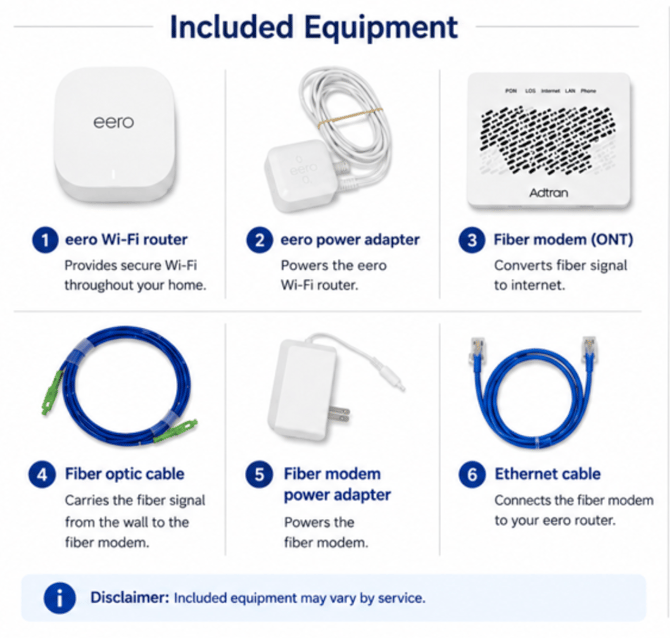
Before You Begin
Locate the fiber entry point inside your home.
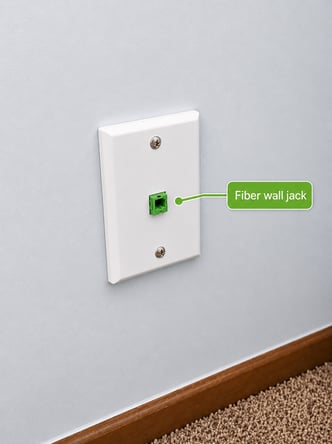
Step 1: Connect the Fiber Cable
Use the included fiber patch cable to connect the fiber wall jack to the ONT.
.jpeg?width=335&height=448&name=A%20cable%20plugged%20into%20a%20wall%20outlet%20AI-generated%20content%20may%20be%20incorrect%20(1).jpeg)
-
Always hold the fiber cable by the green plastic ends when connecting or disconnecting it.
-
The fiber cable and port are keyed and only insert one way.
-
You should hear and feel a click when the cable is fully inserted.
Step 2: Power On the Fiber ONT
Connect the ONT power cable to the ONT and plug into a power outlet.
The ONT will begin a startup sequence and cycle through several lights.
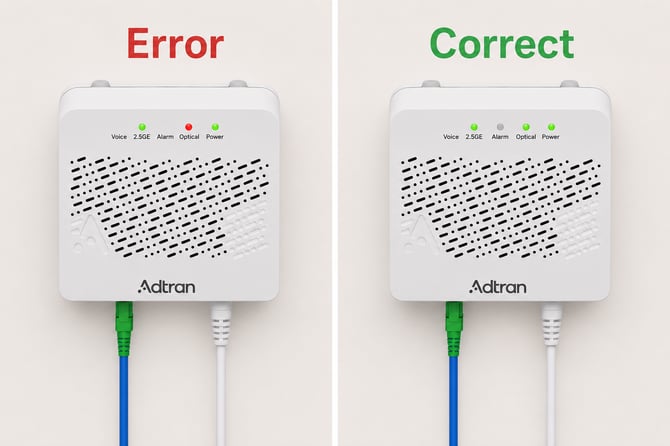
Allow up to 10 minutes for the ONT to fully power on and complete any necessary updates before moving to the next step.
If your ONT shows a red Optical light after 10 minutes, contact support at 888-274-6381 for assistance.
Step 3: Connect Your eero Router
- Plug the included Ethernet cable into the Ethernet port on the ONT.
- Connect the other end of the Ethernet cable to your eero router.
- Connect the eero router power cable and plug into a power outlet.
- Wait for the eero status light to blink blue.
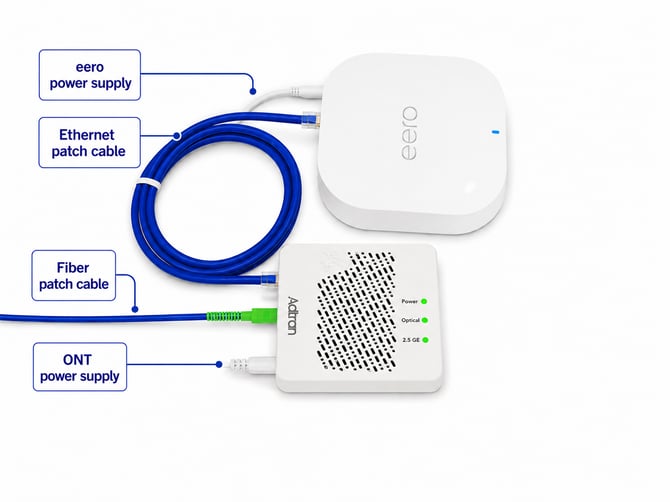
Any Ethernet port on standard eero routers can be used as the input connection.
If your ONT has multiple Ethernet ports, use the port labeled 10GE.
If your eero status light is solid red, contact support at 888-274-6381 for assistance.
Step 5: Set Up Your Wi-Fi Network
Click the icon to download the eero app.


The Eero app will guide you through:
- Creating your Wi-Fi network
- Naming your network
- Setting your Wi-Fi password
- Adding additional Eero devices

Step 6: Verify Wi-Fi Coverage
Once setup is complete:
- Walk through your home with a mobile device
- Confirm you have a strong Wi-Fi signal in all desired areas
If coverage is weak in certain locations, try repositioning your Eero devices for better performance.
Step 7: Complete Activation
After your equipment is connected and your Wi-Fi network is active, call 888-274-6381 to finalize your installation.